Saturday, May 10, 2014

Fix for Slow Chrome dials on a Bakelite Telephones

Chrome type 12 dials used on 200 series and 300 series vintage GPO telephones can run slow over time. The instructions below explain how to safely take the dial apart to clean/lubricate the governor and gears to fix this problem. You can do this without removing the dial from the Bakelite case of the telephone (we have only removed it for clarity of the photographs).


1) Firstly NEVER EVER Spray WD40 or other oil directly into these old dials. The backing to the dial number plate (seen on photographs below) is similar to emulsion paint and is VERY porous. WD40 or other lubricants will soak into this, badly discolouring it and most likely destroying part of the numbers. We see more dials badly damaged by people doing this than any other cause.

2) Using a very small flat bladed screwdriver carefully prise out the metal circlip that holds the paper dial label insert in place (usually covered with a plastic clear label cover).


3) Remove the clear cover and dial lable to expose the centre screw.


4) Next remove the CENTRE screw (and only the centre screw) with a flat bladed screwdriver, and lift it off the chrome finger dial.

5) Carefully remove the larger circlip holding the number plate in position (looks like piano wire). I do this with a compass point, and I think this is the fiddliest part of the procedure.
6) At this point the dial number plate can be lifted out exposing the inner workings of the chrome dial.

7) Notice in the next photograph (below) the back of the dial number plate, which is the porous backing that WD40 or other lubricants will absorb into, and permanently de-colour and damage. Be VERY careful not to get any oil near this part.


8) Use a cotton bud to apply (very sparingly) a small amount of watch makers lubricating oil or graphite to the inside of the governor cap (see below).


9) Next use a cotton bud to apply (very sparingly) a small amount of watch makers lubricating oil or graphite to the gear teeth (see picture below).

10) Reassemble the dial in the reverse order.
11) If you have been successful you should be able to dial a “0” and in the time it takes to say (at a steady pace) “one thousand one hundred and one” the dial should return to its rest position.

Tuesday, March 20, 2012

Changing the Microphone in a Bakelite Telephone

Old British Bakelite Telephones such as the 200 series and 300 series telephones used the same handset. This Bakelite handset was known as a model no 164 handset, and was used for over 30 years. It was the standard telephone handset in 1929 and was manufactured all the way through to the early 1960's.


Compared to today’s modern telephone handsets it has a very good ear piece (or receiver). Its only weakness is that the microphone (or transmitter) in the mouthpiece does not live up to today’s expectations of sound quality. This lack of sound quality is only noticeable to the people at the other end of the telephone call. When you are using one of these antique telephones the person at the far end will think you are calling them from the bottom of a well :-) This can be rectified by swapping the old carbon granule microphone out with a modern electronic (electret) microphone. Several makes of replacement electret microphones are available however they must be designed for use in old telephones.

The instructions below show you how this microphone change can be performed.

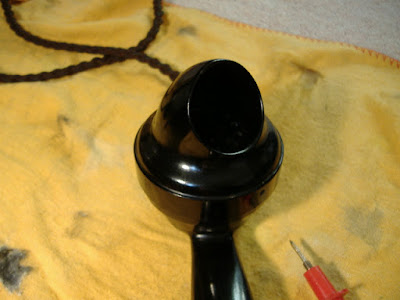
1) First remove the Bakelite mouthpiece from the handset. If you are unsure how to remove it safely, please see the details on our web page removal of a bakelite mouthpiece.

2) The old Carbon Granule Microphone should just lift out (it is not hard wired).


3) Use a small flat bladed screwdriver to remove the old microphones spring clips (see photographs below).


4 ) Attach two wires to the new electronic microphone ideally red and white wire should be used to make life easier when you fit it (see photograph below). Thankfully new electret microphones used in these vintage telephones are not polarity sensitive, so it does not matter which way round you connect the wires.


5) Connect the new red wire from the microphone to the old red wire inside the mouthpiece, and the new white wire to the old white wire inside the telephone mouthpiece.


6) Modern electronic microphones are smaller than the old carbon granule ones, so you will usually need to cut a small piece of foam to fill the gap to stop the new microphone from rattling around inside the old telephone handset.


7) Finally refit the Bakelite mouthpiece on your handset and test the Bakelite telephone.


Providing the rest of your antique telephone is in good order, the sound quality and usability of your old Bakelite Telephone should be significantly improved.

Tuesday, January 24, 2012

Fitting a 1960's or 1970's Vintage Wall Telephone (Part 1).

This is an explanation of how to physically fit, or safely remove British 1960's (model No 711) or 1970's-1980's (model 741) vintage wall telephones to a wall.


1) The fist step is to locate and unscrew (half way out) the telephone case retaining screw on the bottom of the wall telephone. See the pictures below.


2) Next carefully lift the case starting from the bottom of the telephone, as it hinges at the top (however keep the telephone case parallel to the base plate). This can be tricky if you have not done it before.

TIP: It helps if you hold the telephone switch hooks down and press gently down on the vintage telephone dial while lifting the case from the bottom. See the position of my hands in the diagram below.


3) The vintage wall phone case should now lift completely off. See diagrams of the telephone below.


4) The retaining screw for the separate metal T shaped wall fitting is a single bolt/screw at the bottom, however it is hidden behind where the curly handset cord enters the telephone. So you need to slide the telephone handset cable grommet to the right, as shown below.


5) You should now be able to unscrew the single bolt that holds the T shaped bar to the vintage telephone. As shown below.


6) The telephone is hinged a the top, so simply lift from the bottom as shown above.

7) With the T shaped bar separate fit this to your wall with the appropriate screws for the type of wall it needs to fix onto.


8) Slide the curly handset cable grommet back into its original position.
9) The 741 or 711 Telephone can then be hung onto the T bracket at the top, and the retaining bolt tightened at the bottom.


10) Refit the wall telephone case, making sure the cut out in the plastic dial surround ring is in line with the metal finger stop, see below.


Tip: Holding the switch hooks down and pressing on the dial usually makes fitting the case easier.


11) Finally tighten the case retaining screw at the bottom.


12) These instruction should help, either remove these old telephones from the wall or fit them to a new position.

Thursday, October 09, 2008

Fix for 332 earpiece quite problem


An old GPO engineers maintenance trick for fixing the problem of the earpiece being quite on an early Bakelite 332 telephone is as follows:

1) Unscrew the Bakelite earpiece (anticlockwise)


2) Slide the metal diaphragm (thin metal disk) sideways off the earpiece magnets (make a note of which way round it is)


3) Make sure the two screws either side of the magnet are tight.


4) Spray the metal diaphragm (both sides) with a small amount of WD40 and wipe off with a piece of paper kitchen towel.
5) Replace the metal diaphragm (the opposite side up to the way it was removed) by sliding it sideways back onto the magnetic coils.
6) Screw the Bakelite earpiece back on.

Then try the telephone again and see if this improves the sound (works about 50% of the time).

Sunday, July 20, 2008

Safely Removing a Bakelite Mouthpiece

To safely remove the mouthpiece from a British Bakelite telephone handset (Type 164) used on both 200 series and 300 series Bakelite telephones, follow the following instructions.


1) Carefully insert a fine pointed instrument such as a compass point or probe from a multimeter (as shown below) into the release hole of the Bakelite mouthpiece. Be very careful not to damage the Bakelite.


2) Applying gentle pressure to the release spring inside the mouthpiece rotate the bakelite mouthpiece anticlockwise by 1/2 an inch (as shown below).


3) At this point the Bakelite mouthpiece should just lift clear of the main telephone handset.


4) The carbon granule microphone is now exposed.
5) Replacement of the mouthpiece is simple, just put the Bakelite mouthpiece on and rotate it 1/2 clockwise (if adjusted correctly it will lock onto the telephone handset).

Wednesday, May 09, 2007

Converting a British 332 Telephone

Several people have asked me for more detailed instructions about how to convert a British 332 Bakelite telephone (with a picture). 90% of the "converted telephone" are NOT converted correctly so here is the correct way to perform this conversion:

1) Remove the base plate of the telephone (using the 4 screws in the corners)
2) Remove all existing wire straps
3) Insert strap between T1 and T2
4) Insert strap between T8 and T9 (as seen on the diagram below)
5) Connect the white wire of the line cord to terminal T1
6) Connect the red wire of the line cord to terminal T9
7) Connect the blue (bell) wire of the line cord to terminal T11
8) Connect the spare green wire of the line cord to terminal T3
9) Insert a 3K resistor between terminals T11 and T12.


Hopefully the diagram should make this conversion a little easier :-)
Good luck

Wednesday, December 27, 2006

Cleaning Bakelite Telehones (and plastic phones)

After years of practice I believe the best way to clean Bakelite and plastic Telephones is as follows:
Carefully dismantle the telephone as much as possible. Then
  1. Clean the Bakelite with a good non abrasive chrome cleaner such as autochrome. Working the cleaner into the telephone in a circular motion.
  2. The next stage and most important stage is to use "paste polishing number 5" from greygate chemical products specifically designed for cleaning Bakelite telephones.
  3. Finish with a good quality "carnauda" car wax (that containing no silicones)
At each stage use plenty of elbow grease and patience. For the final polish use a clean cotton duster
Please let me know if you ever find a better way to clean Bakelite phones. or have any useful information about old British telephones.

Fix for a Slow dial on 746 Telephones and 706 Telephones

Vintage 746 telephone and 706 telephone dials are lovely high quality mechanical devices (similar in many ways to antique clocks) however be...